
If the data collector cant communicate with the 3manager server it will show an "invalid data collector ID". If this happens, please follow the guide:
Check if a proxy server is used:
- Is the data collector ID correct? Try copy and paste again and make sure all numbers are included and no white space.
- Is proxy server used? TIP, if you copy this:
https://services.3manager.com/AgentConfigService.svc and paste it in your Internet browser.
If it says "You created a service" It means that the computer has access to the Internet, but the data collector needs to have proxy server added and eventually user and password. - Security reasons are often experienced. For this, you would need to have the IT-admin to allow the data collector to send data.
- If the data collector still doesn't succeed in getting access try the following actions.
- Try to use Proxy without authentication (remove the checkmark)
- If you didn't try using it with authentication, then try this by adding user and password and domain.
- Some proxy configurations require "Domain" and some don't. If it didn't work with domain entered, please try again without it. (The field "Domain" should be empty)
How to check if its the security settings:
- Open the data collector from the desktop where it's installed
- Click "Settings"
- Click "Connection settings"
- Remove the "Send secure" flag
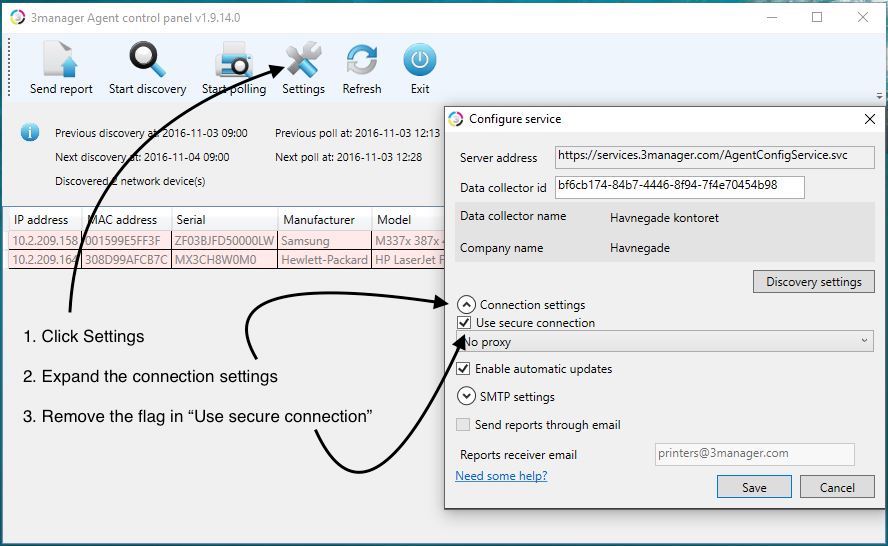
If the data collector starts to discover, then its because you need to whitelist the data collector to send data.
Related:
- White paper (includes IP address of the server and more security information)
Comments
0 comments
Please sign in to leave a comment.